

INBOX
Customer Inbox
Gmail and Outlook sync for home-service teams. See the full thread alongside notes, tasks, appointments, estimates, invoices, and portal context.
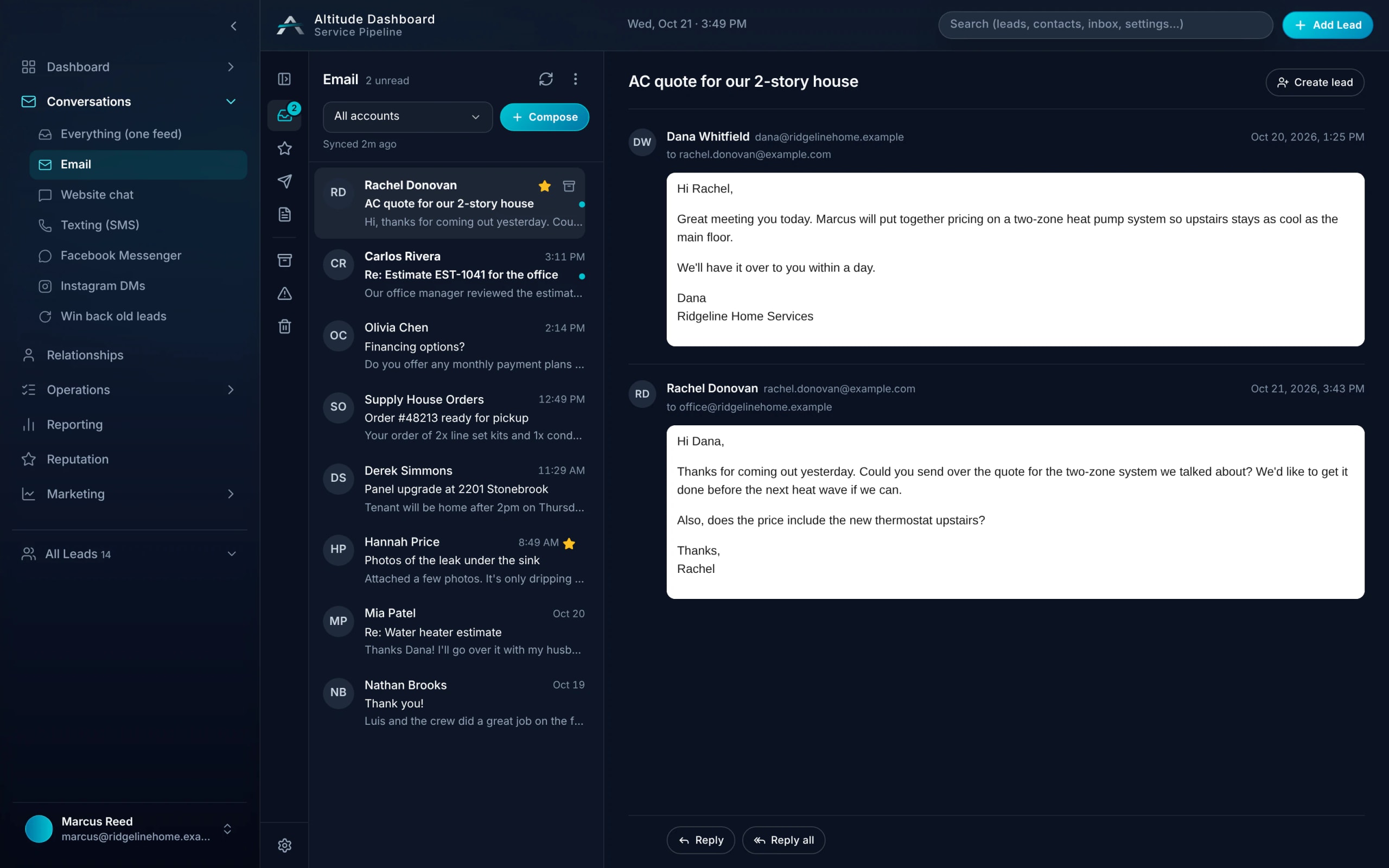
Inbox in a real job.
Greg's 7:44 AM reply came in as a text. When a customer emails instead, Inbox puts that Gmail or Outlook thread on the same lead, with the office's notes alongside.
Follow the whole job, first ring to paidRidgeline Home Services
No. 004218
Greg Albright · Water heater, no hot water
- 7:42 AMMissed callTexted back automatically
- 7:44 AMCustomer replied“No hot water. Can someone come today?”
- 8:10 AMVisit scheduledToday 11:00–12:30 · Luis O.
- 12:05 PMEstimate approvedGas valve + thermocouple
- 12:40 PMInvoice paidCard, from the invoice link
$650.00
Inbox with context.
Step 01
Connect email
Gmail or Outlook · OAuth in Admin
Step 02
See customer threads
Full thread in Inbox
Step 03
Add notes
Notes alongside the thread
Step 04
Pull leads into Pipeline
Thread and notes come with it
Step 05
Context stays attached
Schedule, estimate, invoice, and portal
Reduced tab switching
Thread, notes, job context, appointment status, and invoice history in one place. Your office stays in flow.
- 01
Gmail and Outlook sync
Connect your email. See customer threads in Inbox. Every message attaches to the right lead, job, estimate, and invoice context.
- 02
Notes alongside the thread
Add notes to the conversation. Your office sees the full story before a callback, estimate visit, or invoice follow-up.
- 03
Pull leads into Pipeline
One click to create a lead from an email. Thread and notes come with it.
- 04
Chat and Inbox together
Live chat conversations flow into the same system. Pipeline, Inbox, Chat, Tasks, and Portal context stay together.
Inbox, in plain English.
Still wondering? Ask the people who built it.
Which email providers are supported?
Gmail and Outlook. Connect in Admin. OAuth-based — secure, no password storage.
Can I see the full email thread?
Yes. Full thread with your notes attached. No switching between tabs or tools.
Can I turn an email into a lead?
Yes. One click creates a lead from an email, and the full thread and your notes come with it into Pipeline.
Can I set follow-up tasks from an email thread?
Yes. Set a task from any thread, and the next step shows up in the Today view with the conversation attached.
Your next customer is about to call.
Be the shop that answers. Free for 30 days, and we do the setup.