

Marketing insights
See which marketing turns into jobs.
ALTITUDE already holds your leads, your follow-up and your invoices. Marketing insights reads them and tells you, in plain words, where your work comes from, where it slips away and what to do next.
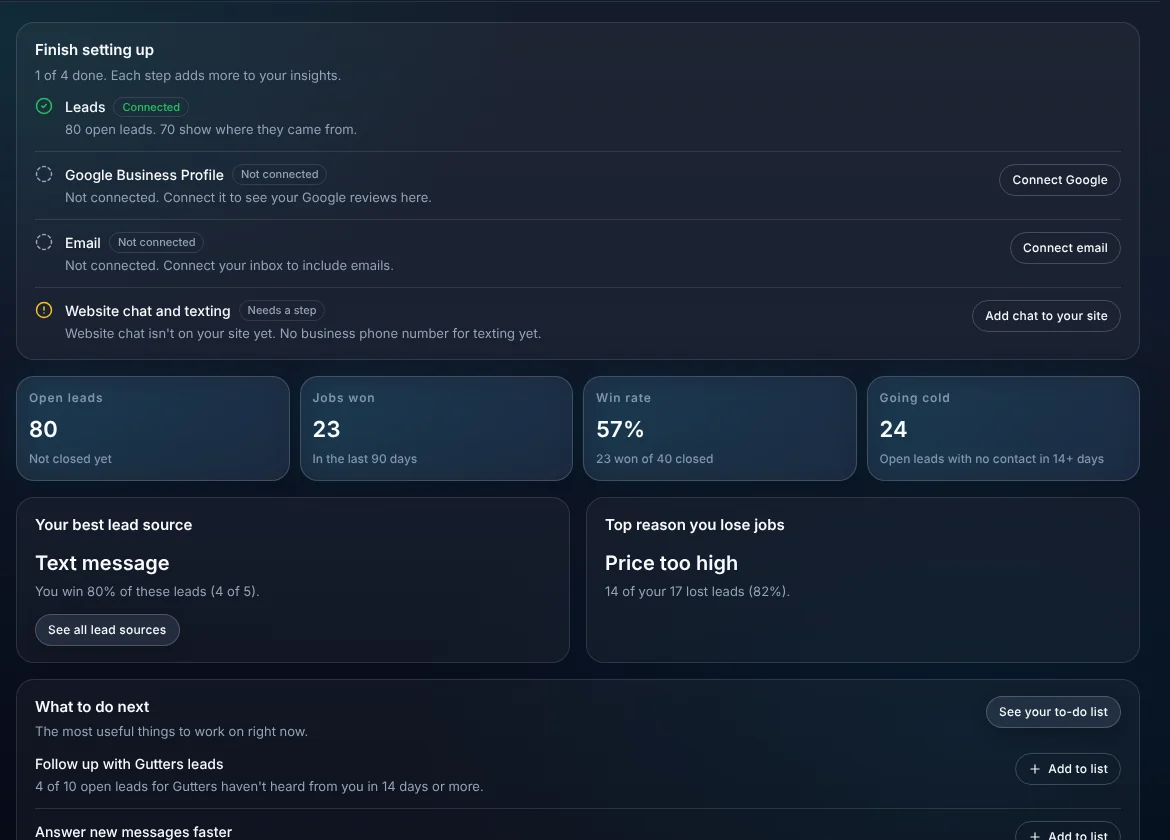
- Summary, sources, services, follow-up, questions, to-do
- 6 views
- Ad connections can never change or spend on your ads
- Read-only
- For the basics. It reads the leads you already have
- 0 setup
Watch it work
From a number to something you do today.
See which source wins the most work, spot the leads going cold, and put the fix on your to-do list.
What to do next
6 leads from Google search are going cold. Nobody has followed up in over a week.
01 · Lead sources
Where the work really comes from.
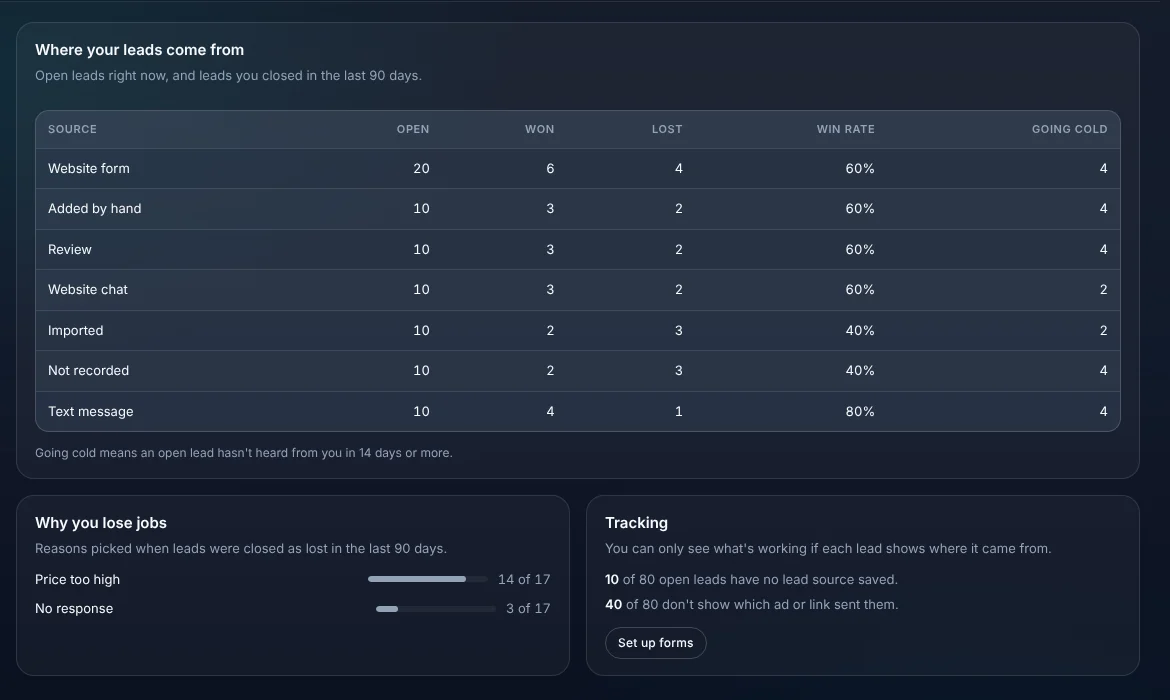
Every lead has a source. ALTITUDE counts how many from each one are open, won and lost, and works out the win rate, so you can see that the yard signs beat the paid listing.
- Open, won and lost leads for each source.
- Win rate by source.
- Leads going cold, by source.
- The top reasons you lose jobs.
- A check on how many leads have a source at all.
02 · Follow-up
Most lost jobs were never really chased.
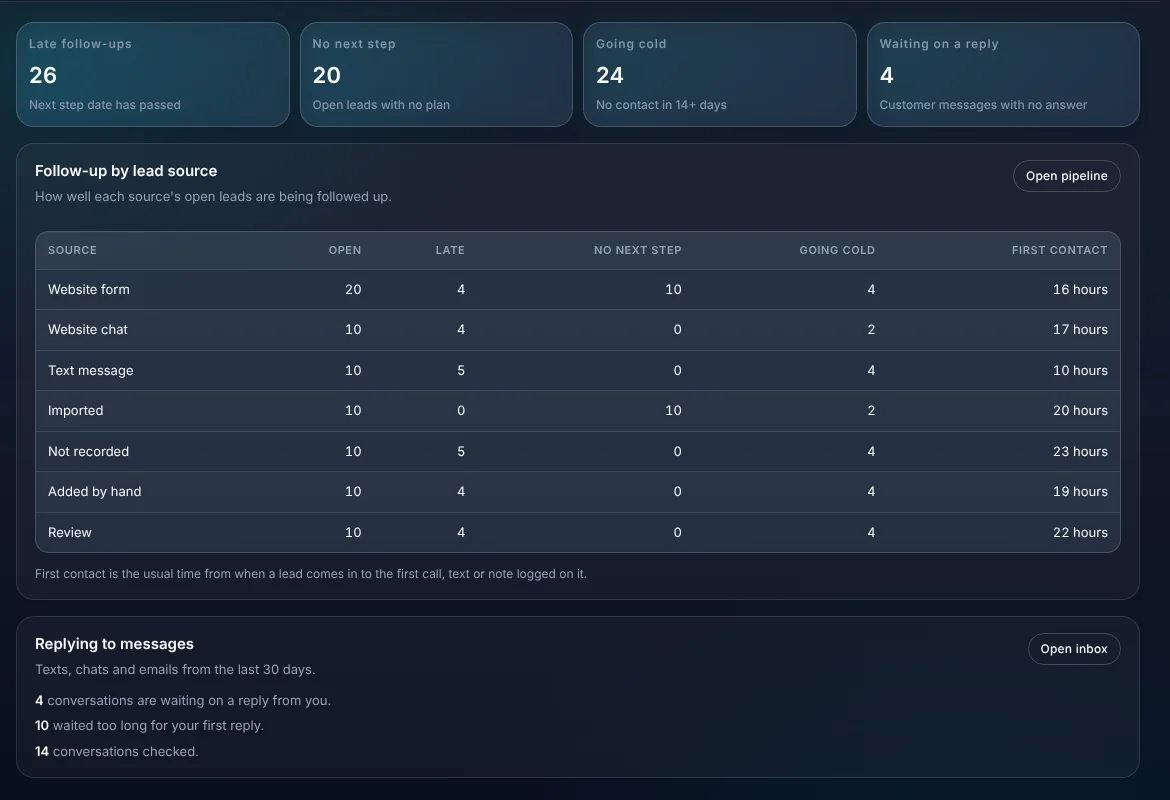
The Follow-up view shows who is waiting on you: late follow-ups, leads with no next step and leads going cold. It also shows how fast each source gets its first reply.
- Late follow-ups and leads with no next step.
- Leads going cold before anyone calls back.
- Customers waiting on a reply.
- Time to first contact, by source.
03 · Customer questions
What people keep asking you.
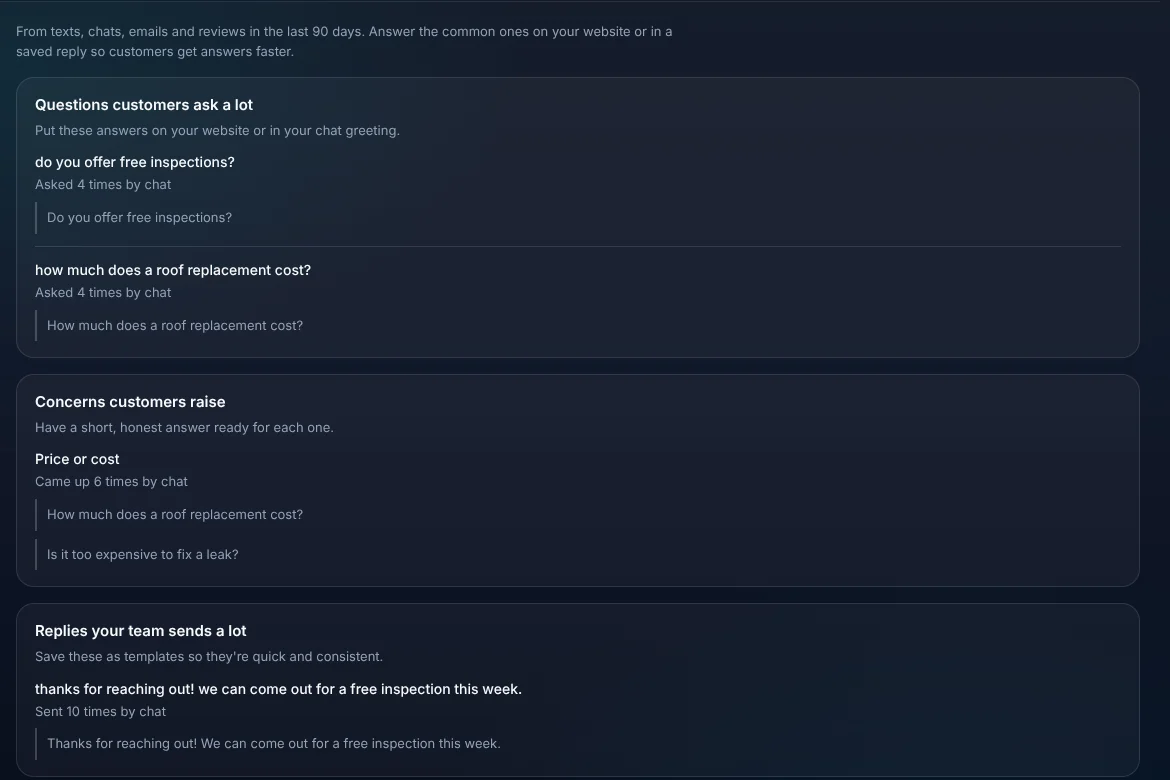
ALTITUDE reads your texts, chats, emails and reviews and groups what it finds: the questions asked a lot, the worries that come up, and the answers your team keeps typing.
- Questions customers ask most.
- Concerns that come up before they book.
- Replies your team sends again and again.
- Good material for your website, your chatbot and your posts.
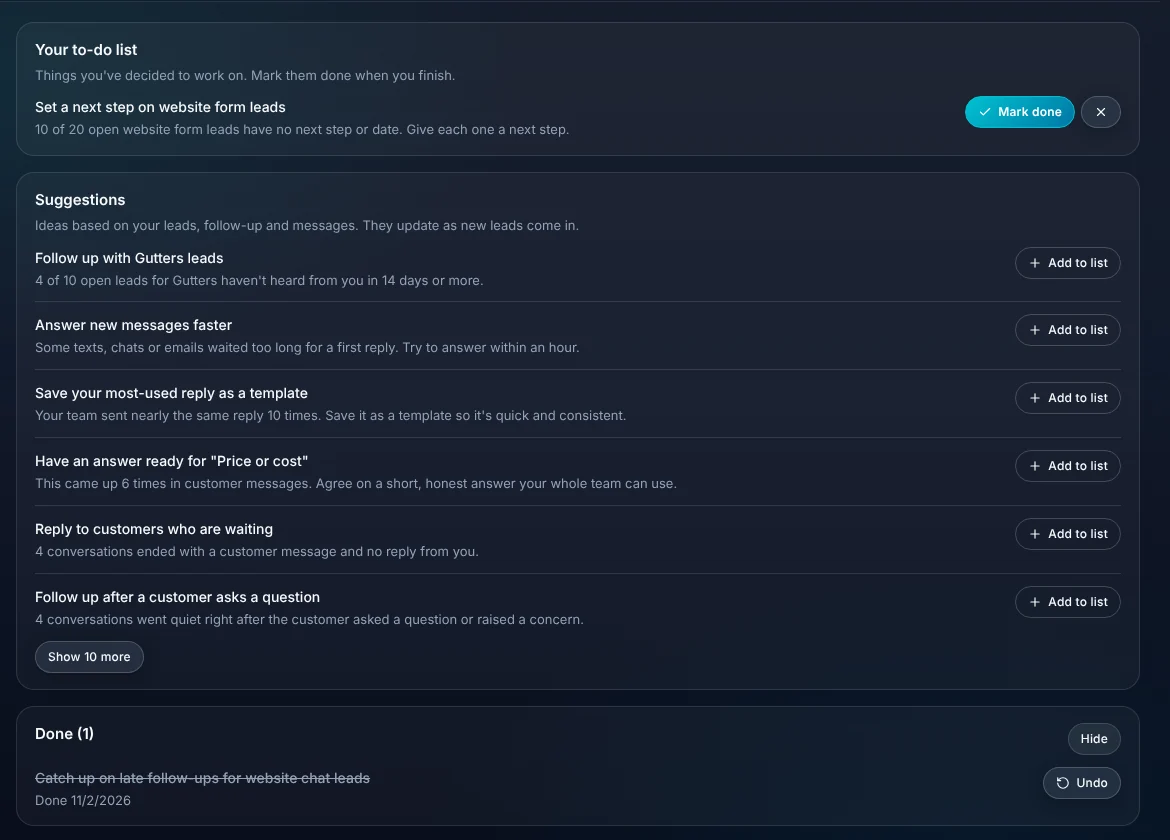
04 · To-do list
Insights that end in a task.
A chart doesn't fix anything. Each suggestion says what to do and why, and one tap adds it to a to-do list you can work through.
- Suggestions written in plain words.
- Add a suggestion to the to-do list in one tap.
- Tick things off as you go.
- Look at the last 30 days, 90 days or 12 months.
05 · Tracking links
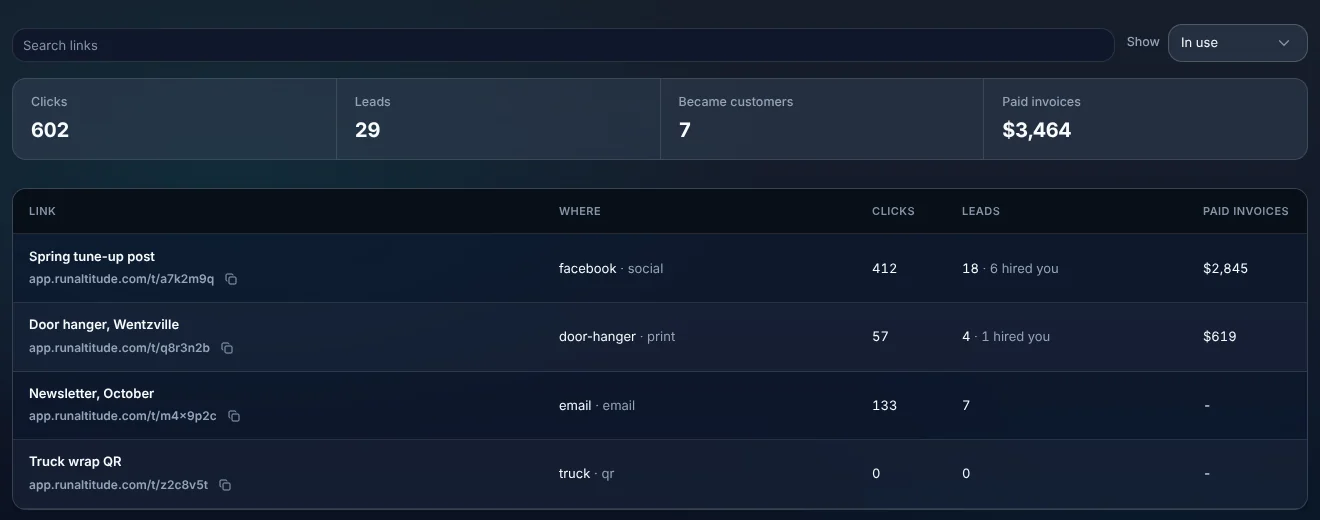
One short link per flyer, sign or post.
Make a link for each place you advertise. ALTITUDE counts the clicks, and when the page it points to has your ALTITUDE form or chat, the leads, new customers and paid invoices that followed.
- A short link for every flyer, post, email and yard sign.
- Clicks counted on every link.
- Leads, new customers and paid invoices per link.
- Tags for source, medium, campaign and version.
06 · Ad connections
Your ad numbers, next to your real jobs.
Run your own ads, or have your agency run them. Connect Google Ads or Meta and ALTITUDE pulls in the last 30 days of numbers so they sit beside your leads. It only reads. It can't change, pause or spend money on your ads.
- Connect Google Ads and Meta ad accounts.
- Read-only: nothing in your ad account can be changed from ALTITUDE.
- An admin connects and picks the account.
- Get the latest numbers whenever you want them.
What you stop paying for.
Most shops find out what works by gut feel, or by paying someone for a monthly report.
- A monthly marketing reportThe numbers come from your own leads and invoices, any day you look.
- A link shortener and a spreadsheetTracking links that count leads and paid invoices, not just clicks.
- Asking "how did you hear about us?" and forgettingThe source is on the lead from the first contact.
Everything Marketing insights does.
On every plan, once an admin turns on Marketing.
Insights
- Summary
- Lead sources
- Services
- Follow-up
- Customer questions
- To-do list
Numbers
- Open, won and lost by source
- Win rate
- Why you lose jobs
- Leads going cold
- Time to first contact
- 30 days, 90 days or 12 months
Tracking and ads
- Tracking links
- Clicks, leads and paid invoices per link
- Google Ads connection
- Meta ads connection
- Read-only ad data
Guides that cover this workflow
Longer reads on the CRM and follow-up workflows this feature is part of.
Marketing insights, in plain English.
Still wondering? Ask the people who built it.
Does ALTITUDE run my ads?
No. You or your agency run them. ALTITUDE connects to your ad account to read the numbers, and it can't change, pause or spend money on your ads.
Do I need to connect anything to use it?
No. Lead sources, follow-up and customer questions come from the leads and conversations already in ALTITUDE. Ad connections and tracking links are optional extras.
How does it know where a lead came from?
From the source on the lead. Website forms, chat and tracking links set it for you, and your team can set it by hand on calls and walk-ins.
Can it tell me which flyer worked?
Yes, with a tracking link on each flyer. When the link points to a page with your ALTITUDE form or chat, you see the leads and paid invoices that came from it.
Who can connect an ad account?
A workspace admin. Everyone else can read the numbers.
Your next customer is about to call.
Be the shop that answers. Free for 30 days, and we do the setup.