

Dispatch and routing
See every crew's day in order, and cut the driving.
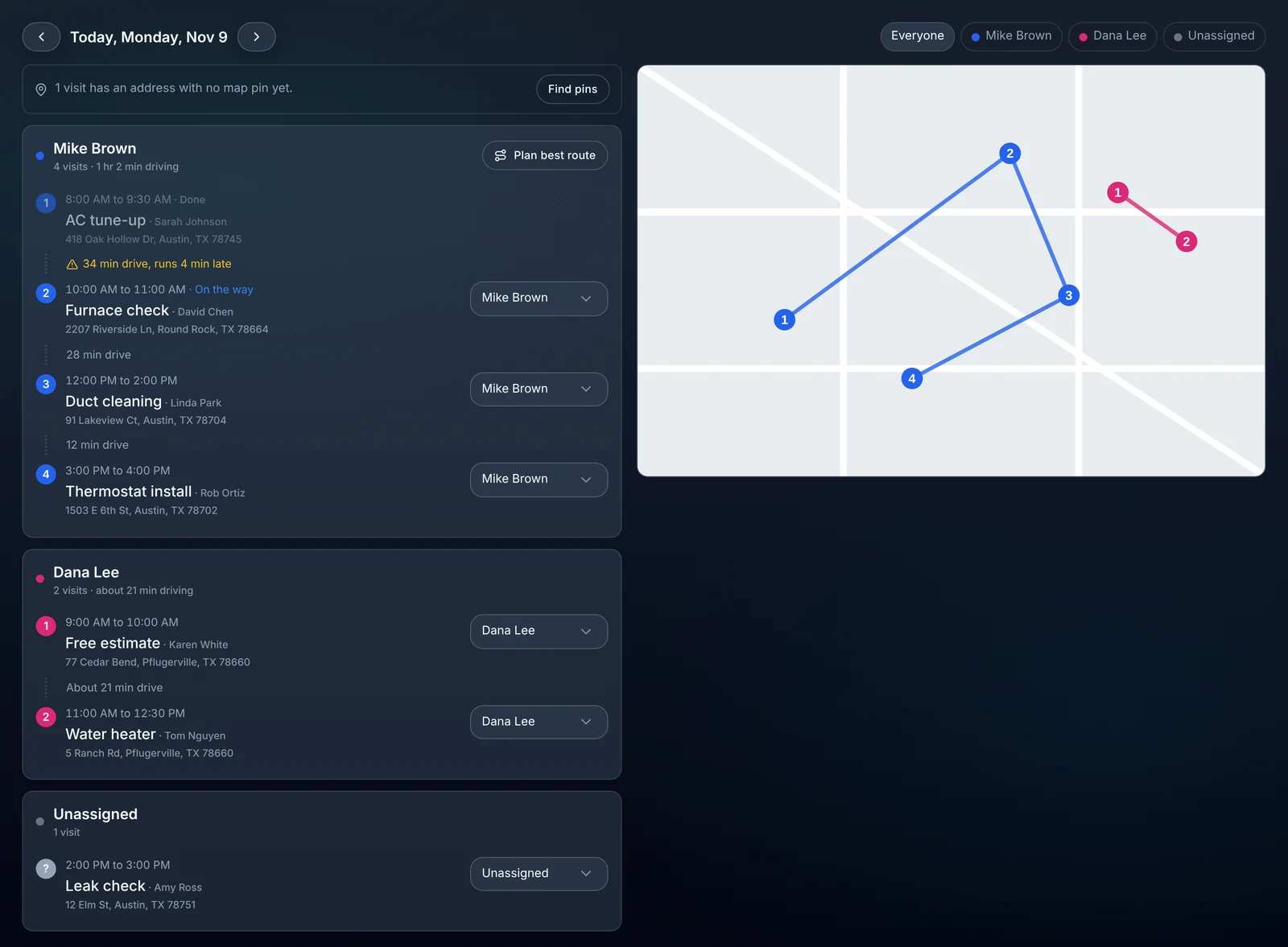
The dispatch view lines up each person's visits in the order they're driven, with the drive time between stops and a map. One button plans a better route, and customers get a text when the tech is on the way.
- Plans the best order for a person's day
- 1 button
- Dispatch and routing are included
- Every plan
- Tracking link in every on my way text
- Live
Watch it work
A shorter day, and you decide whether to use it.
Plan best route shows a new order and how much driving it saves. Use it and the stops reorder.
01 · The day at a glance
Each person's stops, in driving order.
Pick a day and see a lane for every person: their visits numbered in order, the drive between each, and the total driving for the day. Visits nobody owns yet sit in their own lane.
- Visit count and total drive time for each person.
- A warning where the drive doesn't fit between two visits.
- Reassign a visit to someone else from the list.
- A map with each person's stops numbered and colored.
- Works on a phone, with the map above the list.
02 · Route planning
A better order, worked out for you.
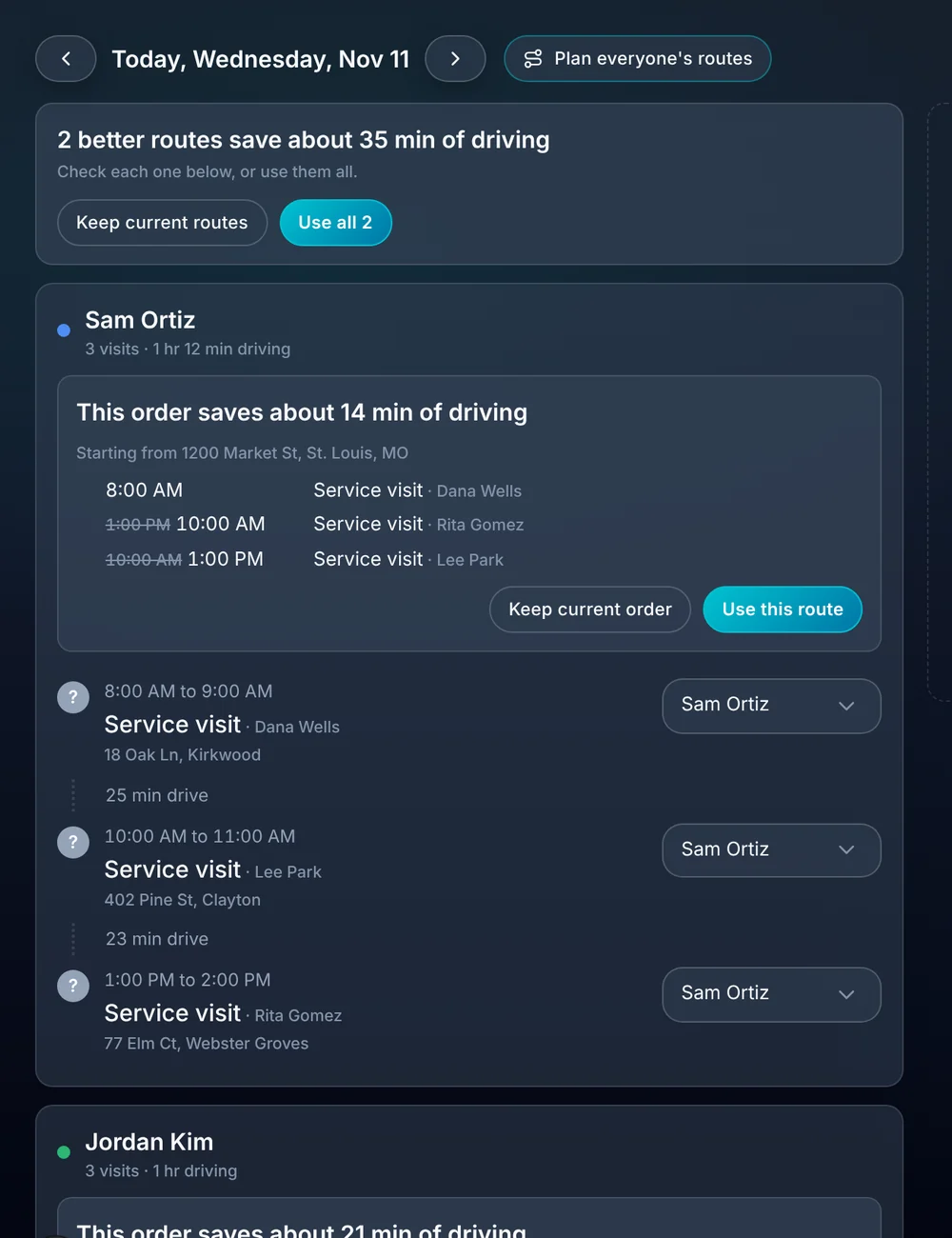
Press Plan best route for one person, or plan everyone's day at once. ALTITUDE shows the new order and how much driving it saves, and you decide whether to use it.
- See the minutes saved before you change anything.
- Use one route, all of them, or keep the day as it is.
- Applying a route updates the visit times.
- Customers whose time changed can be told their new time.
- Routes can start from your shop or yard.
03 · On my way
Customers stop calling to ask where you are.
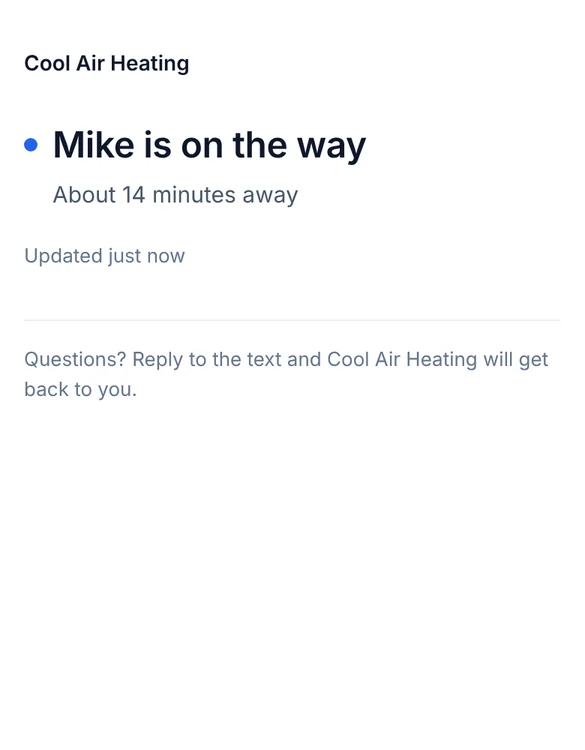
The tech taps On my way and the customer gets a text from your business number with a link. The link shows who's coming and about how far away they are.
- Sent from your business number, with the tech's first name.
- A live page with about how many minutes away.
- The tech taps Arrived and the link stops showing a location.
- The customer can reply to the text and reach your office.
04 · Map lookups
Clear limits, no surprise bill.
Putting an address on the map and working out a drive uses a map lookup. Each plan includes a set number every month, and settings shows how many you've used.
- Addresses and drives already looked up are free.
- The count starts over each month.
- Need more? Buy a pack in the app. Nothing is billed automatically.
- If you run out, drive times fall back to estimates until the month starts over.
What you stop paying for.
Dispatch reads the same calendar your office books on.
- A route planning appRoutes are planned from the visits already on your schedule.
- Where are you callsThe on my way text answers the question before it's asked.
- A whiteboard of who's whereEvery person's day is on one screen, in order.
Everything dispatch and routing does.
On every plan.
Dispatch view
- A lane for each person
- Visits in driving order
- Drive time between stops
- Tight drive warnings
- Unassigned visits lane
- Reassign from the list
- Map of the day's stops
Routes
- Plan one person's best route
- Plan everyone's routes at once
- Minutes saved shown first
- Apply to update visit times
- Tell customers their new time
- Start from your shop or yard
On my way
- Text from your business number
- Live tracking link
- Minutes away estimate
- Arrived and stop controls
- Works from the crew app
Dispatch and routing, in plain English.
Still wondering? Ask the people who built it.
How does route planning work?
Open the dispatch view for a day and press Plan best route for a person, or plan everyone's. ALTITUDE works out the order with the least driving and shows the time saved. If you use it, the visit times update.
Do customers get told when a route changes their time?
They can be. When you apply a route that moves a visit, ALTITUDE can send those customers their new time.
What does the customer see in an on my way text?
A short text from your business number with a link. The link opens a page with the tech's first name and about how many minutes away they are, and it stops showing a location once the tech arrives.
Is there a limit on routing?
Each plan includes map lookups every month for new addresses and drive times. Ones already looked up are free, settings shows your count, and you can buy more in the app if you need them.
Is this full fleet dispatch software?
No. It's built for small and mid-size crews: who goes where, in what order, and how long the drive is. It doesn't track vehicles or parts inventory.
Your next customer is about to call.
Be the shop that answers. Free for 30 days, and we do the setup.