

QuickBooks sync
Your books match the job, without typing anything twice.
Connect QuickBooks Online once. Customers, estimates, invoices, payments and your products and services stay in step both ways, so your bookkeeper sees what the office sees.
- Changes flow in both directions
- 2 way
- Things kept in step: customers, estimates, invoices, payments, items
- 5
- QuickBooks sync is included
- Every plan
Watch it work
Paid in ALTITUDE, recorded in QuickBooks.
The customer pays by card. The invoice and the payment show up in QuickBooks Online without anyone typing them in.
01 · What syncs
The whole money trail, not just the invoice.
ALTITUDE copies what your office creates to QuickBooks Online and brings back what changes there.
- Customers.
- Estimates.
- Invoices, with their line items.
- Payments, including ones recorded in QuickBooks.
- Your products and services.
- Voided invoices in QuickBooks are voided in ALTITUDE.
02 · How it behaves
Predictable rules, in plain words.
You shouldn't have to guess what a sync will do. These are the rules.
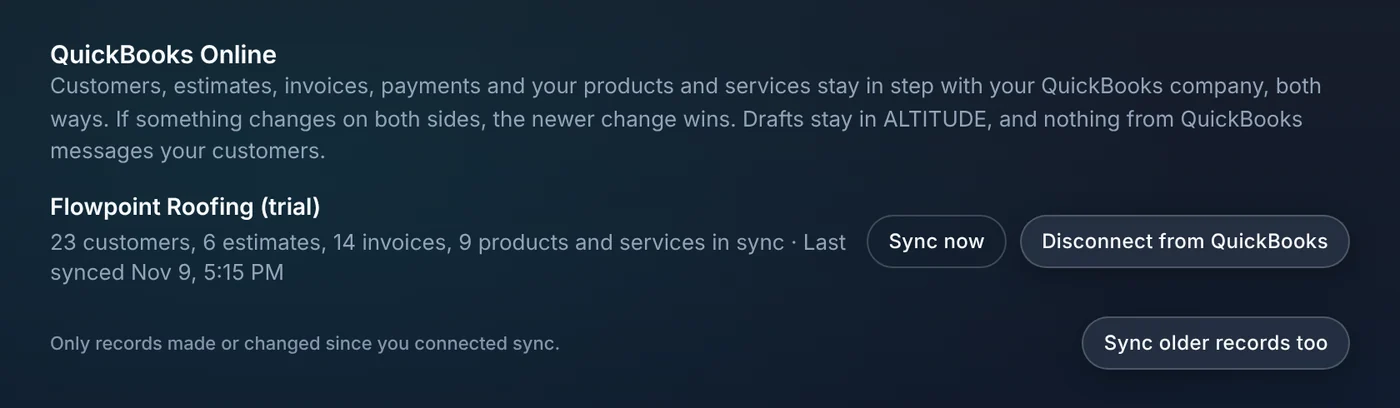
- If something changes on both sides, the newer change wins.
- Drafts stay in ALTITUDE until you send them.
- Nothing that comes from QuickBooks emails or texts your customers.
- Only records made or changed since you connected sync, unless you ask for older ones.
- Older records can be brought in too, a batch at a time.
03 · Staying in control
See where it stands, and sync when you want.
The QuickBooks card in settings shows what's in sync and when it last ran. It syncs by itself, and there's a Sync now button for when you're closing out the day.
- Counts of customers, estimates, invoices and items in sync.
- The time of the last sync.
- Sync now, any time.
- A clear message if the QuickBooks sign-in expires, with a reconnect button.
- Pick the sales tax code invoices use in QuickBooks.
- Only owners and admins can connect or disconnect.
What you stop paying for.
QuickBooks stays your accounting system. ALTITUDE stops the double entry.
- Typing invoices into QuickBooksAn invoice sent in ALTITUDE shows up in QuickBooks.
- A connector tool between appsThe sync is built in, with no third tool to maintain.
- Month-end cleanupPayments and voids come back on their own, so the two sides match.
Everything QuickBooks sync does.
On every plan. Works with QuickBooks Online.
Records
- Customers
- Estimates
- Invoices and line items
- Payments
- Products and services
- Voided invoices
Rules
- Two-way sync
- Newer change wins
- Drafts stay in ALTITUDE
- No customer messages from synced changes
- Older records on request
Control
- Automatic syncing
- Sync now button
- In-sync counts and last sync time
- Sales tax code setting
- Reconnect prompt
- Owner and admin only
QuickBooks sync, in plain English.
Still wondering? Ask the people who built it.
Which QuickBooks does it work with?
QuickBooks Online. QuickBooks Desktop isn't supported.
Is the sync one way or two way?
Two way. What you create in ALTITUDE goes to QuickBooks, and changes made in QuickBooks, like a payment recorded there or a voided invoice, come back.
What if the same record is changed in both places?
The newer change wins.
Will connecting QuickBooks email my customers?
No. Nothing that comes from QuickBooks sends a message to your customers.
Does it bring in my old QuickBooks records?
By default it syncs records made or changed after you connect. You can choose to sync older records too, and they come in a batch at a time.
Does ALTITUDE replace QuickBooks?
No. Your books stay in QuickBooks. ALTITUDE handles the customer, the job, the invoice and the payment, and keeps QuickBooks matching.
Your next customer is about to call.
Be the shop that answers. Free for 30 days, and we do the setup.