

LIVE CHAT
Live Chat
Chat widget with offline fallback. Every conversation becomes a lead — captured, connected, and ready for follow-up.
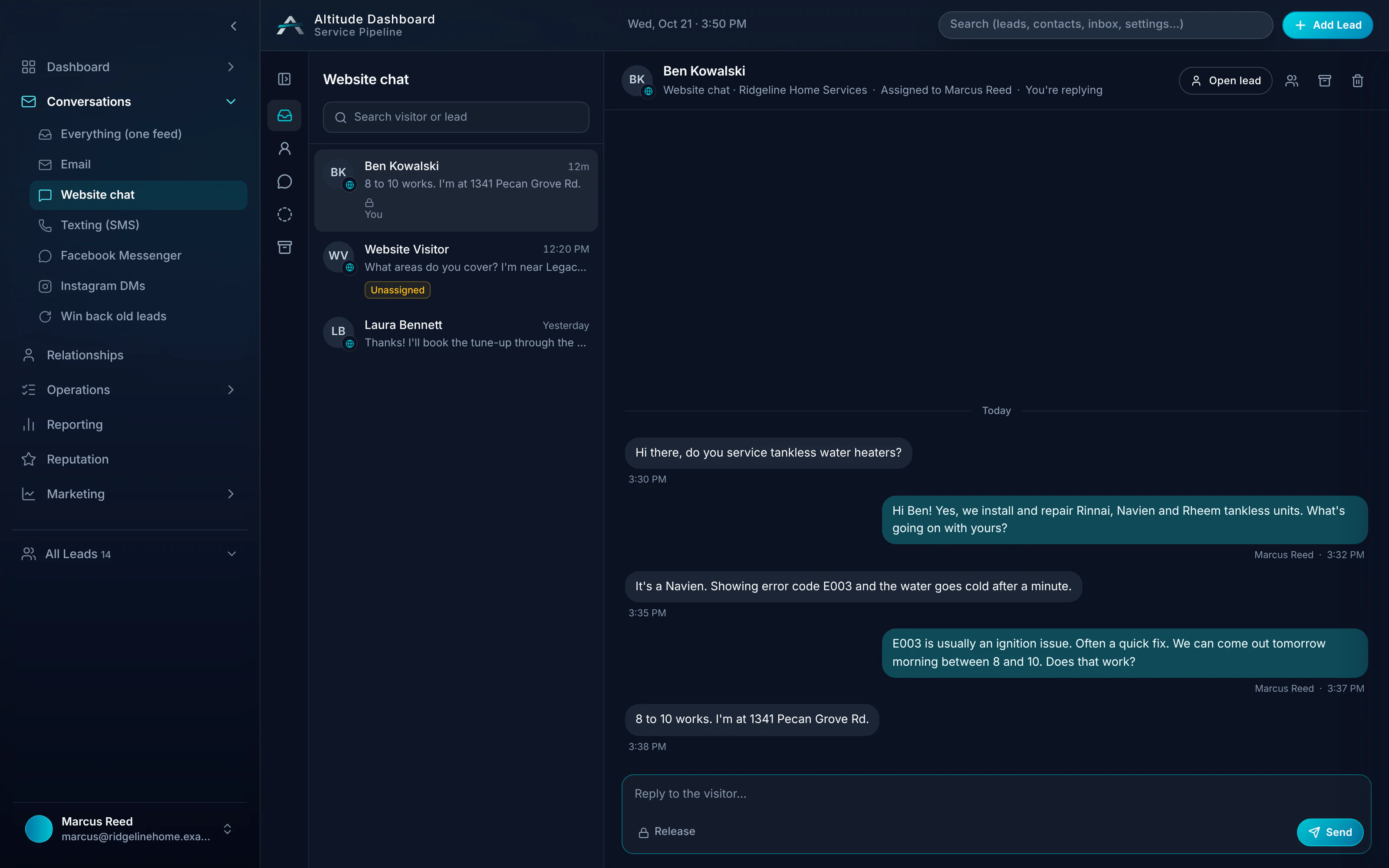
Live Chat in a real job.
Greg called at 7:42 AM, but the same morning could start in the chat on Ridgeline's website. The chat creates his lead and saves the thread, even if no one is online to answer, so the office picks it up with full context.
Follow the whole job, first ring to paidRidgeline Home Services
No. 004218
Greg Albright · Water heater, no hot water
- 7:42 AMMissed callTexted back automatically
- 7:44 AMCustomer replied“No hot water. Can someone come today?”
- 8:10 AMVisit scheduledToday 11:00–12:30 · Luis O.
- 12:05 PMEstimate approvedGas valve + thermocouple
- 12:40 PMInvoice paidCard, from the invoice link
$650.00
From a website chat to a lead.
Step 01
Visitor
"Hi, I need an estimate for a 4-unit HVAC replacement."
Step 02
Your team
"Got it — we'll route this to the office and grab a time."
Step 03
Lead created
Estimate visit task assigned
Fast setup, easy handoff
Install the widget. Connect to Pipeline. Every conversation is captured and ready for follow-up.
- 01
Every conversation becomes a lead
Install the chat widget on your site. Visitors start a conversation — ALTITUDE creates the lead and attaches the thread.
- 02
Offline fallback
When no one is online, the widget still captures the conversation. You follow up when you're back — no missed opportunity.
- 03
Chatbot optional
Rules-based or AI. Setup wizard for service questions, appointment routing, and office handoffs.
- 04
Handoff to Pipeline
Chat leads flow into Pipeline. Full thread in context. Set next step, schedule the estimate visit, or create an invoice — one system.
Guides that cover this workflow
Longer reads on the CRM and follow-up workflows this feature is part of.
Live Chat, in plain English.
Still wondering? Ask the people who built it.
Where do chat conversations go?
Every chat creates a lead. The full thread attaches to that lead in Pipeline. Your team sees the conversation and can set the next step.
What if no one is online?
The widget still captures the conversation. The lead is created and the thread is saved. You follow up when you're back — no lost leads.
Do I have to use a chatbot?
No. The chatbot is optional. Your team can answer chats directly, and every conversation still becomes a lead in Pipeline.
Does live chat work with the inbox?
Yes. Chat and the Customer Inbox live in one system, so every conversation keeps its full context on the contact record.
Your next customer is about to call.
Be the shop that answers. Free for 30 days, and we do the setup.