

Service agreements
Your terms, filled in for each customer and signed before the work starts.
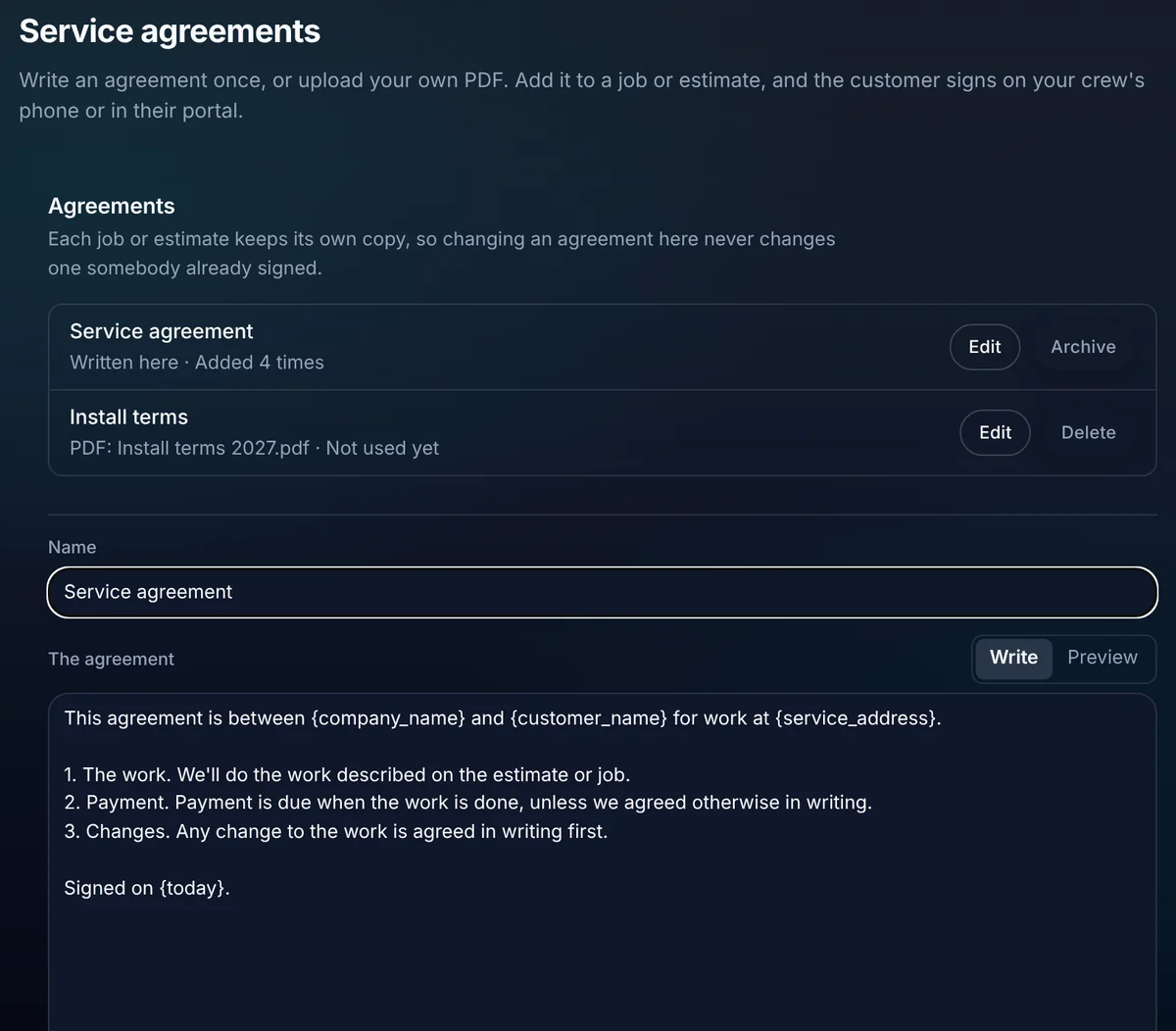
Write your agreement once or upload your own PDF. Add it to a job or an estimate, and ALTITUDE fills in the customer's name, address and job. The customer reads it and signs in their portal.
- Your own words, your own PDF, or both
- Write or upload
- Details that fill in for each customer
- 10
- Service agreements are included
- Every plan
Watch it work
One agreement, filled in and signed.
Add the agreement to the job. ALTITUDE fills in the customer's details, emails them a link and shows the signature when they sign.
This agreement is between Summit Heating & Air and Dana Reyes for work at 48 Oak Ave.
1. The work. We'll do the work described on the estimate.
2. Payment is due when the work is done.
01 · Write it once
No more retyping the customer's name into a Word file.
Write the agreement in settings and click fill-ins into place. Or upload the PDF your lawyer already wrote. Preview shows it with sample details before you use it.
- Fill-ins: customer name, email, phone and service address, your company name, today's date, job title and date, estimate number and total.
- Upload your own PDF of up to 4 MB, with or without written terms.
- Keep as many agreements as you need, like install terms and a waiver.
- An agreement that has been used is archived, not deleted, so the record stays.
02 · Add it to the work
On the job or on the estimate, where it belongs.
Add an agreement from the job or the estimate. Each one keeps its own filled-in copy, so editing your template later never changes what a customer already saw.
- Add from the job drawer or the estimate drawer.
- Email the customer a link to read and sign.
- See signed or waiting at a glance, with the signature once it's in.
- Take off an agreement that hasn't been signed yet.
03 · The customer signs
Signed in the portal, kept on the job.
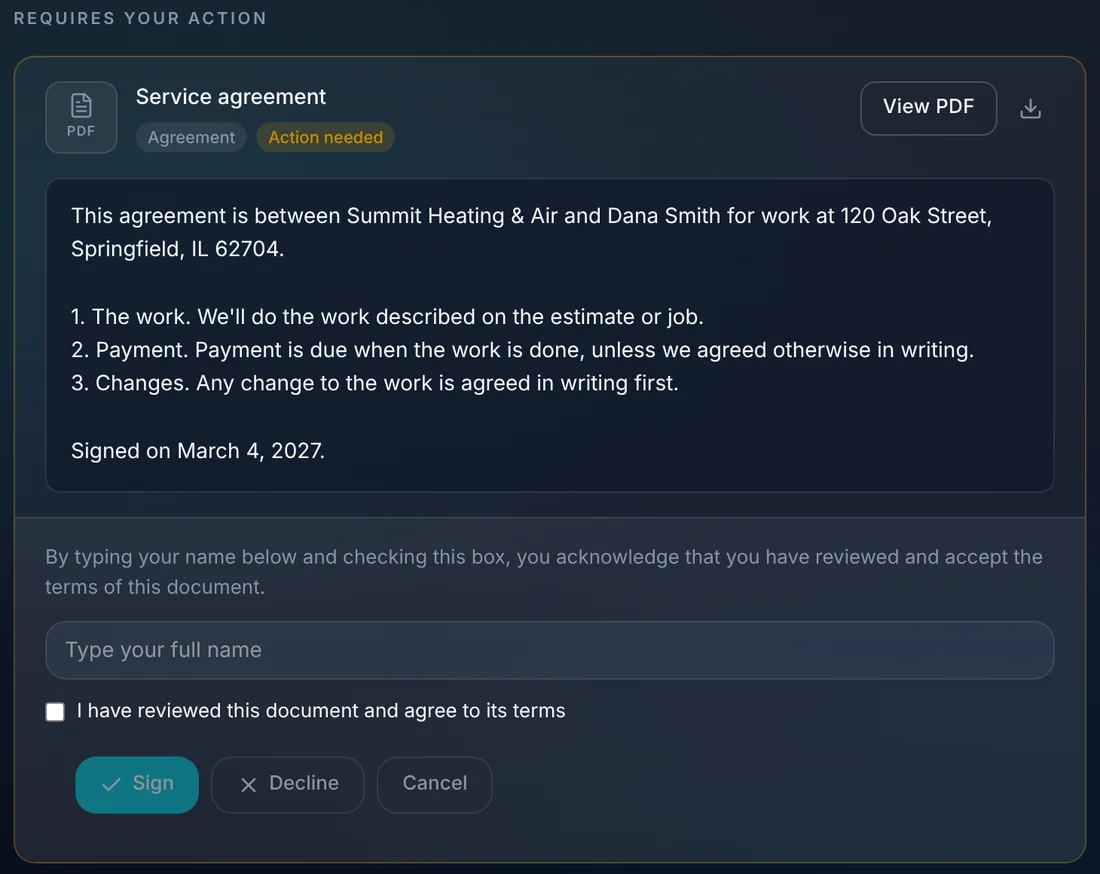
The customer opens the agreement in their portal, reads the filled-in words or your PDF, types their name and signs. Your team sees it on the job right away.
- Read the agreement or view the PDF from any phone or computer.
- Sign with a typed name and a check box, or decline.
- Signed agreements stay in the customer's portal under Documents.
- With the phone apps (coming soon), the customer can also sign with a finger on the tech's phone.
What you stop paying for.
The agreement lives on the job it covers.
- An e-signature appCustomers sign in the portal they already use for quotes and invoices.
- Paper contracts in the truckEvery signed copy is on the job and in the customer's portal.
Everything service agreements do.
Everything Service agreements does today, on every plan.
Write
- Written terms with fill-ins
- Upload your own PDF
- Preview with sample details
- Archive used agreements
Send
- Add to a job
- Add to an estimate
- Email the customer a link
- Each customer keeps their own copy
Sign
- Sign in the customer portal
- Typed name and check box
- Decline
- Signature shown on the job
Service agreements, in plain English.
Still wondering? Ask the people who built it.
Can I use the contract I already have?
Yes. Upload it as a PDF of up to 4 MB. You can also write terms in ALTITUDE with fill-ins, or use both.
If I change my agreement, does it change ones already sent?
No. Each job or estimate keeps its own copy of the words and the PDF from the moment it was added.
How does the customer sign?
In their customer portal: they read the agreement, type their full name, check the box and sign. With the iPhone and Android apps, which are coming soon, they can also sign with a finger on the tech's phone.
Can I add an agreement to any estimate?
To a sent or approved estimate, yes. Not to a draft, a declined or expired estimate, or a canceled job.
Your next customer is about to call.
Be the shop that answers. Free for 30 days, and we do the setup.