

Team and security
Everyone sees what they need. Nobody sees what they shouldn't.
Give each person a role, add extra access where it makes sense, and ask for a second step at sign-in. A log keeps track of the important changes your team makes.
- Owner, Admin, Employee and Viewer
- 4 roles
- Password plus a 6-digit code, if you want it
- 2 steps
- People included on Starter, Professional and Business
- 3, 10, 25
Watch it work
Add a teammate the safe way.
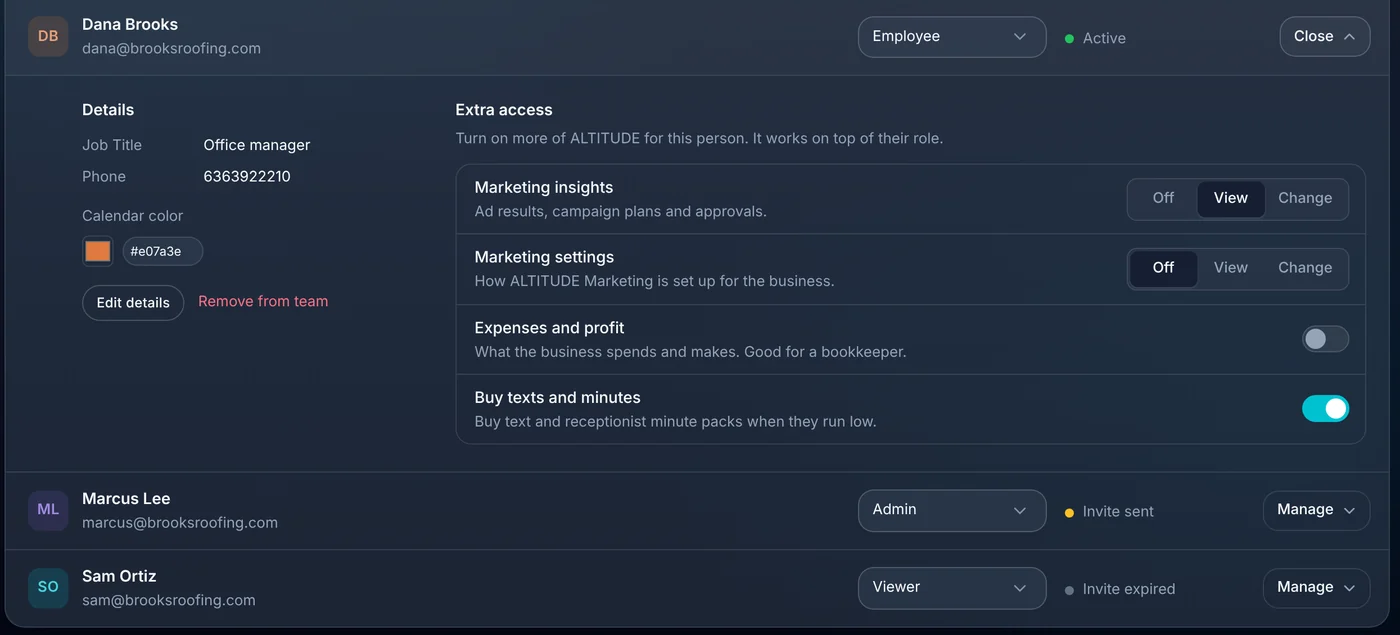
Invite the new office manager as an Employee, let her see expenses, and require two-step sign-in for the whole team.
Extra access
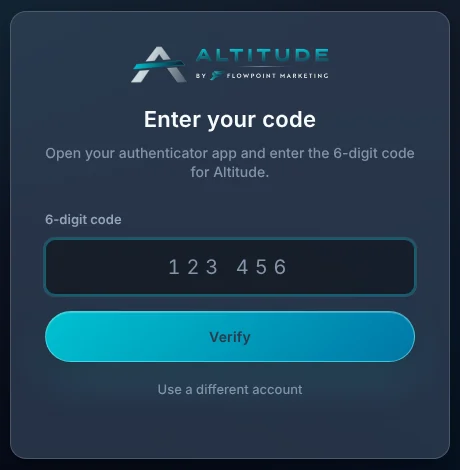
Dana sets up a code before seeing any data.
01 · Roles
Four roles cover almost everyone.
Invite a teammate by email and pick a role. Change it later from the same list, and see who has accepted their invite.
- Owner, Admin, Employee and Viewer.
- See whose invite is sent, accepted or expired.
- Remove someone and their access ends.
- A calendar color for each person.
02 · Extra access
For the bookkeeper who needs one more thing.
Extra access works on top of a role. Let one person see expenses and profit, or let your marketing person change marketing settings, without making them an admin.
- Marketing insights: off, view or change.
- Marketing settings: off, view or change.
- Expenses and profit, for a bookkeeper.
- Buying text and minute packs.

03 · Two-step sign-in
A stolen password isn't enough.
Turn on two-step sign-in and ALTITUDE asks for a 6-digit code from an authenticator app each time you sign in. As an admin, you can require it for the whole team.
- Works with Google Authenticator, Microsoft Authenticator, 1Password and Authy.
- Add a backup app on a second device in case you lose your phone.
- Require it for everyone: teammates set it up before they can see any data.
04 · Activity log
Who changed what.
The activity log is a record of important changes your team makes, like adding a teammate or changing a setting. Filter it when you need to find one.
- New teammates and role changes.
- Settings updates.
- Filters to narrow it down.
What this takes off your plate.
Roles, two-step sign-in and the activity log are part of every ALTITUDE plan.
- One login the whole shop sharesEach person signs in as themselves, with their own role.
- Hoping nobody opens the money pagesMoney and marketing access are switches per person.
- Changing the password when someone leavesRemove them from the team and their access ends, along with any API keys they made.
Everything in team and security.
Everything Team and security does today, on every plan.
Team
- Invite by email
- Four roles
- Invite status
- Remove from team
- Calendar colors
Extra access
- Marketing insights
- Marketing settings
- Expenses and profit
- Buy texts and minutes
Sign-in
- Two-step sign-in with an authenticator app
- Backup app
- Require it for the whole team
Record
- Activity log of important changes
- Filters
- API keys and connected apps you can revoke
Team and security, in plain English.
Still wondering? Ask the people who built it.
How many people can I add?
Starter, Professional and Business include 3, 10, 25 people. Extra people are $19 a month each.
Do I need a special app for two-step sign-in?
Any authenticator app that shows 6-digit codes works, such as Google Authenticator, Microsoft Authenticator, 1Password or Authy.
What if someone loses their phone?
A backup app on a second device lets them sign in. Otherwise, contact ALTITUDE support.
Can I make two-step sign-in required?
Yes. An admin who has it on can require it for the team. Teammates without it are asked to set it up the next time they open ALTITUDE, before they can see any data.
Can a customer see other customers' information?
No. Each customer's portal only shows their own estimates, invoices, visits and messages.
Your next customer is about to call.
Be the shop that answers. Free for 30 days, and we do the setup.