

API and AI connections
Connect ALTITUDE to the tools you already use, including your AI.
Make a key for your own scripts, send events to Zapier, Make or n8n the moment they happen, or sign in from Claude or ChatGPT and ask it to look things up and add them for you.
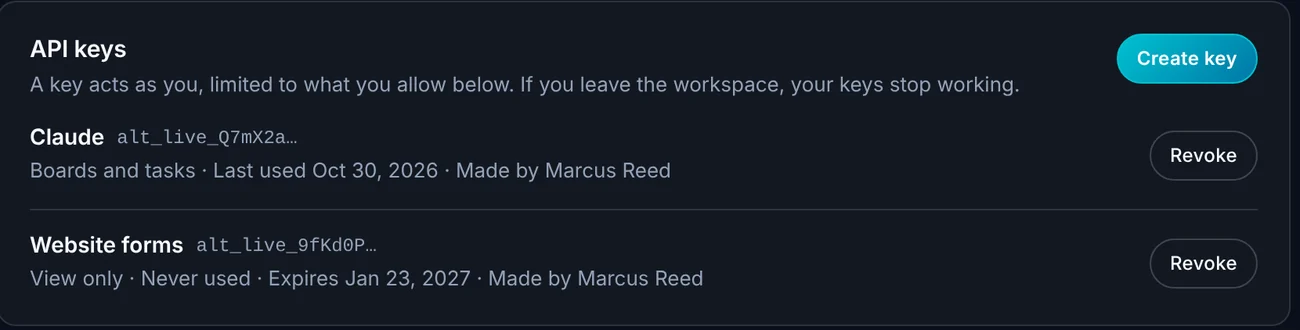
- A key can only do what you tick
- Scoped
- Events sent the moment they happen
- Webhooks
- Claude and ChatGPT connect with a sign-in
- No key
Watch it work
Ask your AI to do the typing.
Connect Claude, allow what it may touch, and ask it to add a lead and a callback task. Both show up in ALTITUDE.
You, in Claude
Add a lead for Maria Lopez, roof leak, and a task to call her tomorrow.
01 · API keys
A key that can only do what you allow.
Name a key, tick what it may see or change, and set when it expires. It acts as the person who made it, so it can never do more than they can.
- Permissions for leads, contacts, tasks and boards, visits, invoices and estimates.
- An optional expiry date.
- Shown once when you make it, and never again.
- Revoke a key any time. Keys stop working if the person leaves.
02 · Webhooks
Tell your other tools the moment something happens.
Send an event to Zapier, Make, n8n or your own app when a lead comes in, moves stage or is archived, when a website form is filled in, and more.
- New lead, lead moved stage, lead archived.
- Website form filled in.
- Each webhook is signed so the receiver knows it's from ALTITUDE.
- Send a test before you rely on it.
03 · AI connections
Your AI assistant, working in your workspace.
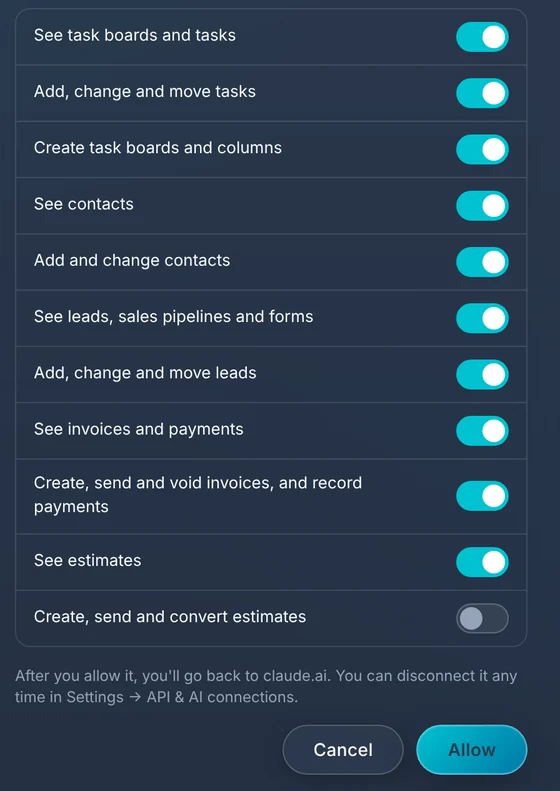
Add ALTITUDE as a connector in Claude or ChatGPT and sign in when asked. You see a switch for each thing it may see or change, and it acts as you.
- Works with Claude and ChatGPT through a sign-in. No key to paste.
- Works with Claude Code, Cursor and similar tools using a key.
- Choose exactly what it may see and what it may change.
- Connected apps are listed in settings with a Disconnect button.
04 · Docs
Written for the person who has to build it.
The developer docs cover getting a key, each endpoint, errors, rate limits and how to avoid duplicates when you send the same thing twice.
- A quick start you can paste into a terminal.
- An OpenAPI file for Postman or a code generator.
- Plain notes on keeping keys safe.
What this takes off your plate.
API keys, webhooks and AI connections are part of every ALTITUDE plan.
- Copying leads between tools by handA webhook or key moves them for you.
- Giving a contractor your loginA key does only what you tick, and you can revoke it.
- Pasting data into a chat windowThe assistant reads and adds records directly, with your permission.
Everything in API and AI connections.
Everything API and AI connections does today, on every plan.
Keys
- Named keys
- Permissions you tick
- Optional expiry
- Last used date
- Revoke any time
Webhooks
- Zapier, Make, n8n or your own app
- Lead and form events
- Signed requests
- Send a test
AI
- Claude and ChatGPT with a sign-in
- Claude Code and Cursor with a key
- A switch for each permission
- Disconnect any time
Docs
- Quick start
- Endpoint reference
- OpenAPI file
- Errors and rate limits
API and AI connections, in plain English.
Still wondering? Ask the people who built it.
Do I need to be a developer to use this?
Not for the AI connection or for Zapier and Make. Connecting Claude or ChatGPT is a sign-in and a few switches. Keys and your own webhooks are for someone comfortable with code.
What can a connected AI assistant do?
Only what you switch on: for example see contacts, add and move leads, add tasks, or see invoices and estimates. It acts as you, so it can't do anything you can't.
What if a key leaks?
Revoke it in settings and it stops working at once. You can also give keys an expiry date so old ones end on their own.
What happens to keys when someone leaves?
Their keys stop working when they leave the workspace.
Is there an extra charge?
No. It's included in every plan.
Your next customer is about to call.
Be the shop that answers. Free for 30 days, and we do the setup.