

Lesson studios
Run the studio: students, weekly lessons, classes and teacher pay.
For music, dance and art studios. Every student's weekly lesson, attendance and make-ups in one list, group classes with a waitlist, teacher pay worked out from what was taught, and a portal where parents see it all.
- Lessons repeat on their own until you end them
- Weekly
- Earned, booked and expired by your rules
- Make-ups
- Worked out from lessons actually taught
- Teacher pay
Watch it work
A missed lesson, handled.
A student is marked absent with notice. She earns a make-up, the office books it, and the teacher's pay only counts the lessons that happened.
Tue, Nov 17 lesson
Pay counts lessons once attendance is marked.
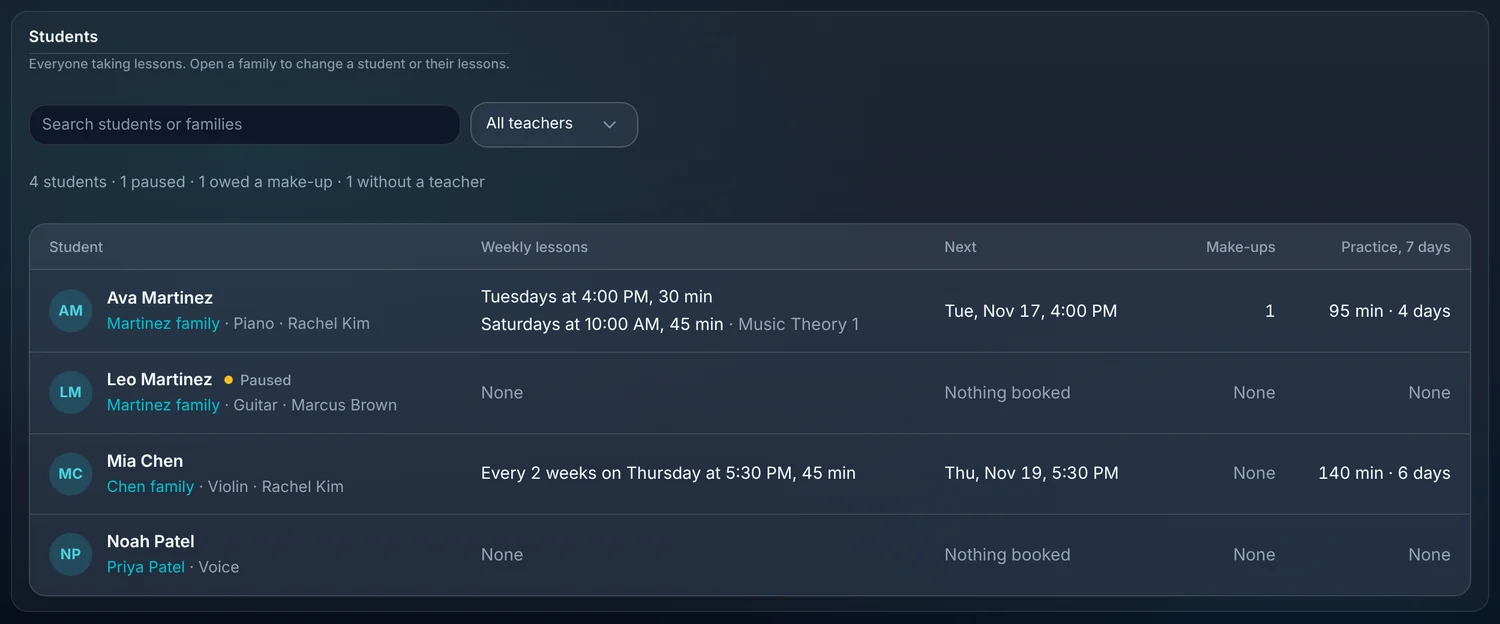
01 · Students
Everyone taking lessons, in one list.
Each student shows their instrument or class, their teacher, their weekly time, their next lesson, any make-ups owed and how much they practiced this week. Open a family to change anything.
- Weekly or every-other-week lessons at a set time and length.
- Search by student or family, or filter by teacher.
- Pause a student without losing their history.
- See at a glance who has no teacher or is owed a make-up.
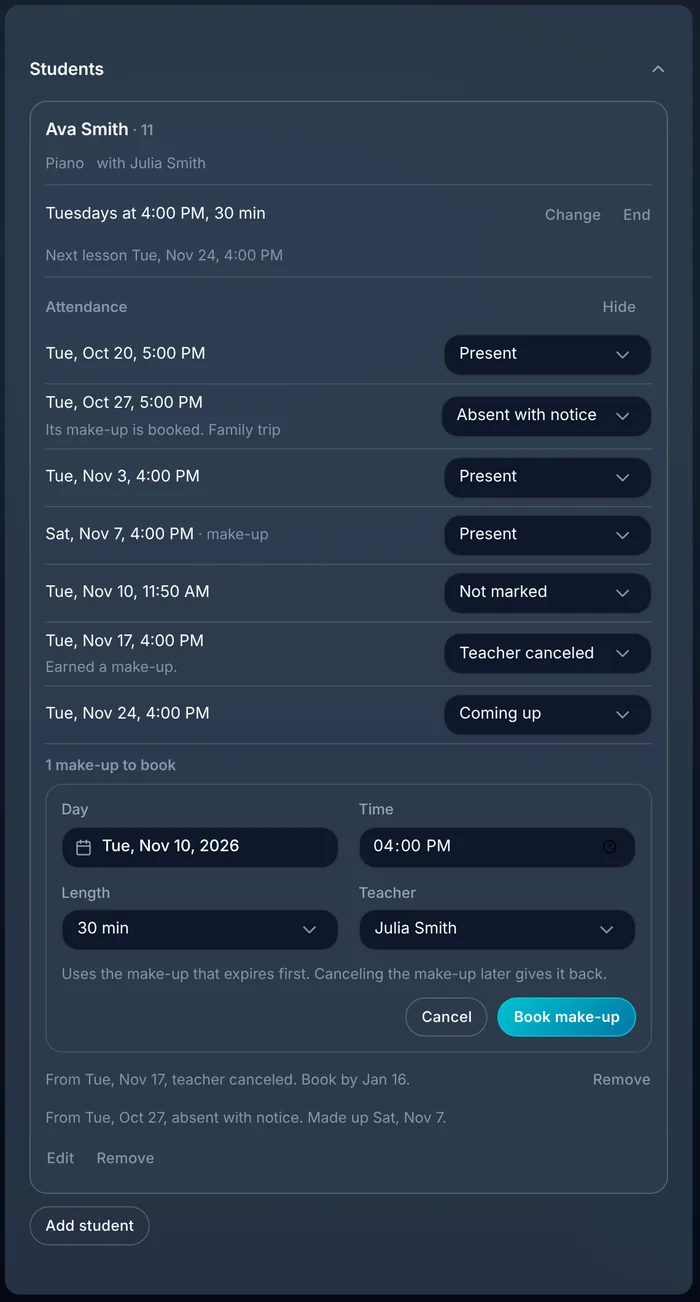
02 · Attendance
Mark the lesson. The rest follows.
Mark each lesson present, absent with notice, no show or canceled by the teacher. You decide which of those earn a make-up and how long a make-up lasts.
- Choose which absences earn a make-up.
- Make-ups expire after the number of days you set.
- Book a make-up with any teacher and it uses the credit that expires first.
- Cancel a make-up later and the credit comes back.
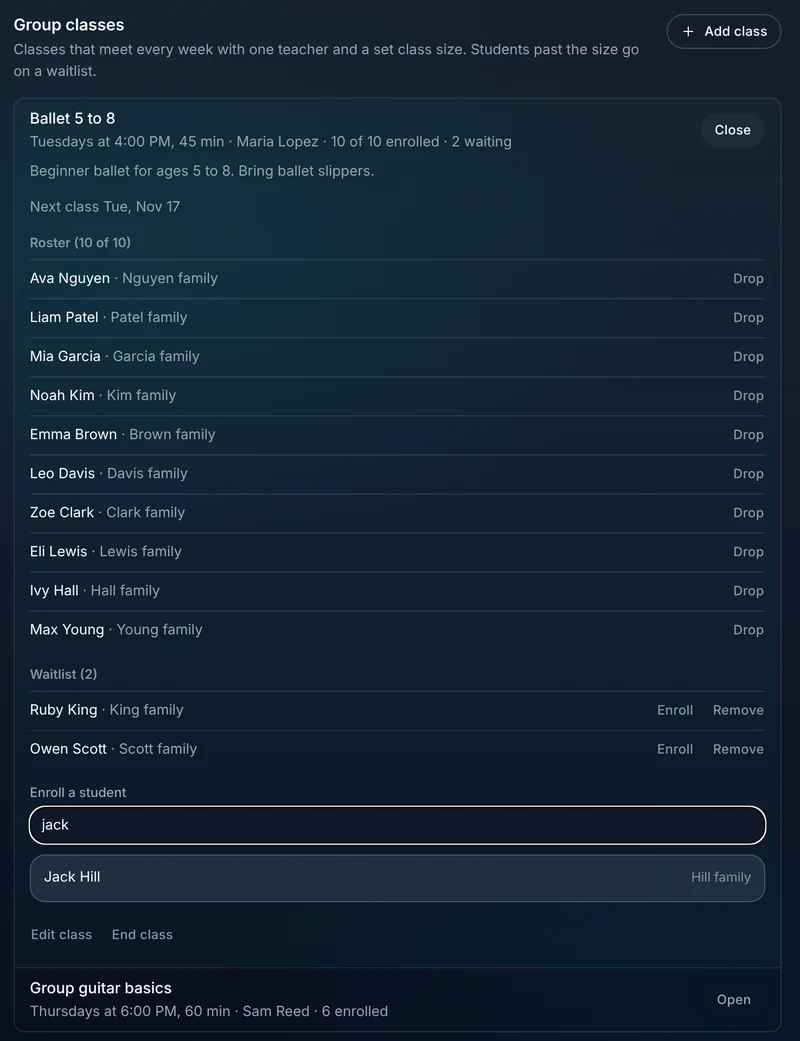
03 · Group classes
Classes with a size, a roster and a waitlist.
Set up a class that meets every week with one teacher and a class size. When it fills, the next students go on a waitlist and you enroll them when a spot opens.
- A roster and a waitlist for each class.
- Take attendance for the whole class on one screen.
- Add a drop-in for a single class.
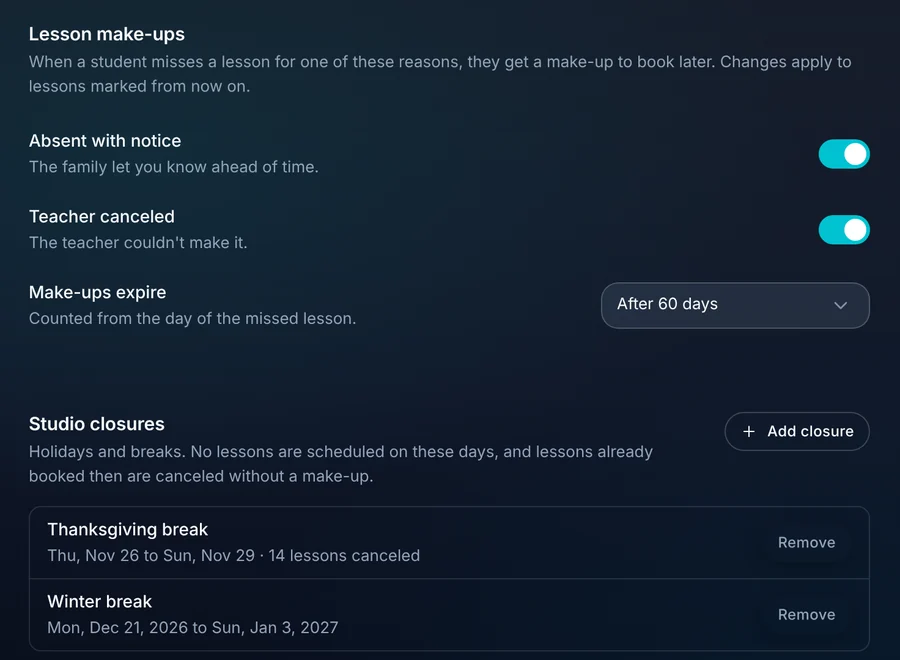
04 · Closures
Holidays without the cleanup.
Add a closure for a holiday or a break. Lessons aren't scheduled on those days, and any already booked are canceled without using a make-up.
- Single days or a date range.
- See how many lessons a closure cancels.
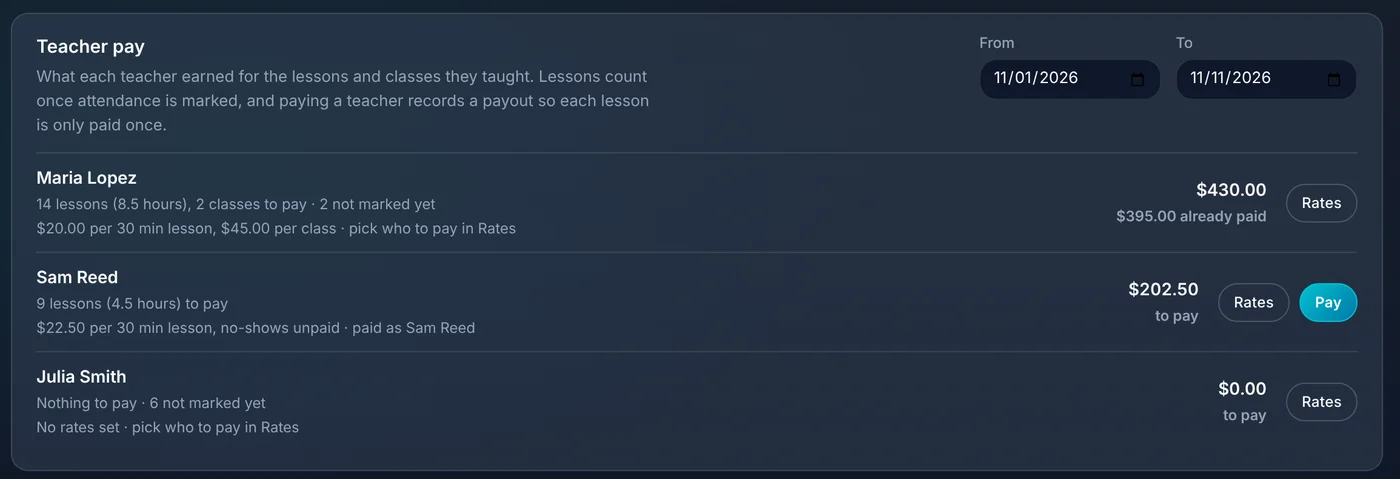
05 · Teacher pay
Pay teachers for what they taught.
Set a rate per 30 minute lesson and per class for each teacher. Lessons count once attendance is marked, and recording a payout means each lesson is only paid once.
- Rates per teacher for private lessons and for classes.
- Choose whether a student no-show is paid.
- See what's still to pay and what's already paid.
- Lessons not marked yet are called out so nothing is missed.
06 · Parents
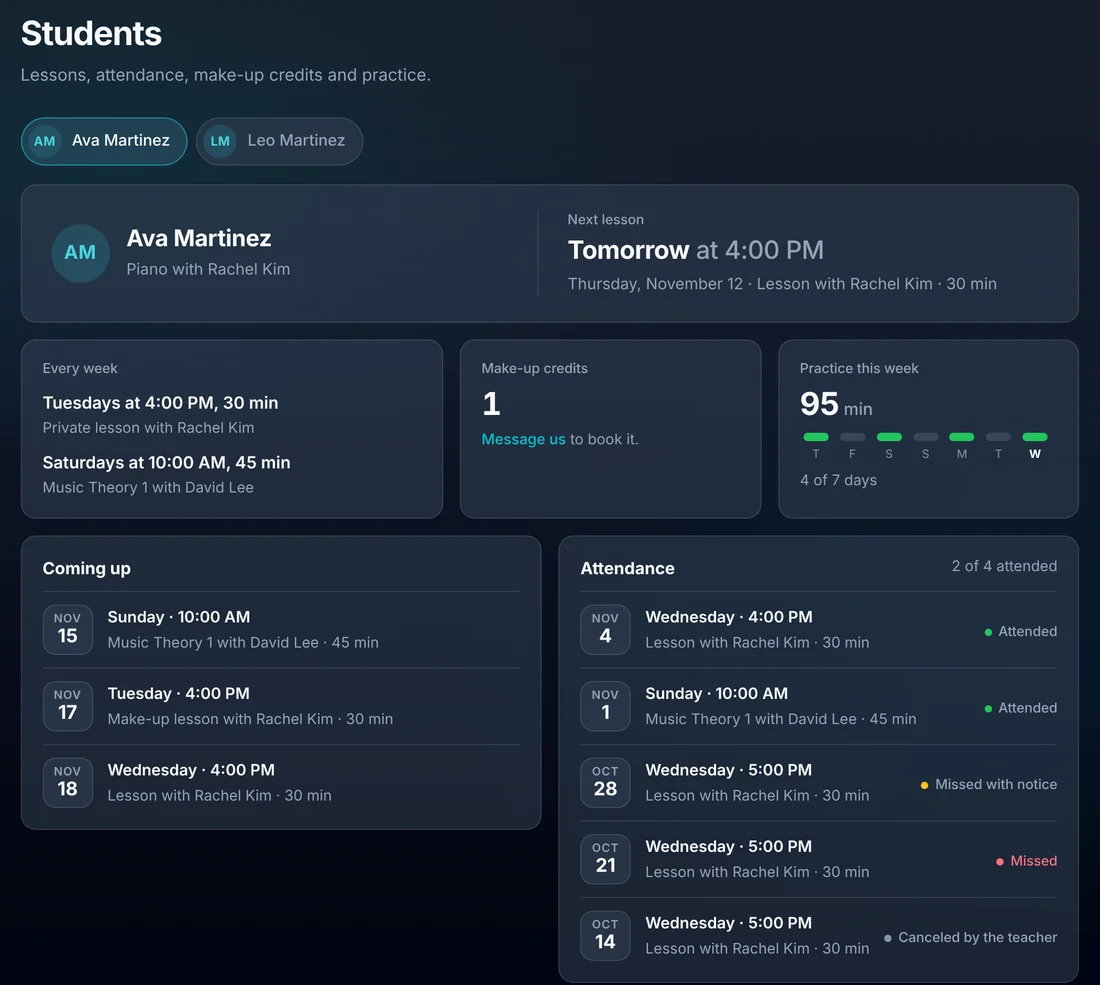
Parents can see it without calling you.
In the family's portal, each student has their next lesson, their weekly times, make-up credits, attendance and a practice log. The same portal is where they pay invoices.
- Next lesson and what's coming up.
- Attendance and make-up credits.
- A practice log families fill in and teachers can see.
- Invoices and payments in the same place.
What this takes off your plate.
The lessons tools are switched on for your studio by our team. Tell us you run a studio when you start your trial.
- A studio scheduling appLessons, classes and closures live on the same calendar as everything else.
- A make-up spreadsheetCredits are earned, used and expired by the rules you set.
- Adding up teacher hours by handPay comes from marked attendance and each teacher's rates.
Everything for lesson studios.
Alongside the rest of ALTITUDE: texting, invoices, online payments, email campaigns and reviews.
Students
- Student list by family
- Weekly and every-other-week lessons
- Pause and resume
- Practice in the last 7 days
Attendance
- Present, absent with notice, no show, teacher canceled
- Make-up rules and expiry
- Book a make-up from the credit
- Studio closures
Classes
- Class size and roster
- Waitlist
- Class attendance on one screen
- Drop-ins
Teachers and parents
- Rates per teacher
- Pay from marked attendance
- Payouts recorded once
- Parent portal with lessons and practice
Lesson studios, in plain English.
Still wondering? Ask the people who built it.
Is this a separate product?
No. It's ALTITUDE with the lessons tools switched on. You get the same texting, invoices, payments and customer portal as every other business, plus students, classes and teacher pay.
How do I get the lessons tools?
Our team switches them on for your studio. Start a trial, tell us you run a lesson studio, and we'll turn them on.
Can I bring my students from the software I use now?
Students and families import from a spreadsheet export, with a preview before anything is saved. Tell us what you're moving from and we'll help.
Do make-up credits expire?
If you want them to. You set how many days a make-up lasts, counted from the missed lesson.
Does it pay my teachers for me?
It works out what each teacher earned and keeps a record of what you paid. You send the money the way you already do.
Your next customer is about to call.
Be the shop that answers. Free for 30 days, and we do the setup.